Gemini in Google Workspace now offers uniform features across all apps, enabling users to perform cross-app tasks more efficiently.
Unified Gemini Features Across Google Workspace
Google has recently upgraded its Gemini functionality in Workspace, allowing users to execute complex tasks from any app, rather than being confined to specific ones. This shift means tasks like generating documents or spreadsheets can now be achieved regardless of whether you're working within Gmail, Docs, or another Workspace application. This move represents a significant attempt to unify the user experience, making Workspace tools feel more interconnected. The implications for professional workflows could be profound.
Streamlined Cross-App Functionality
Previously, the features of the Gemini side panels were tailored to individual applications. Users could only create a personalized document in Docs or build data-driven spreadsheets in Sheets, which often hindered productivity as one had to switch between programs. With the recent enhancements, however, Google's goal is clear: enable a consistent experience across all Workspace tools by integrating Workspace Intelligence and broader app integrations. This kind of move isn't just about improving functionality; it's about changing the way teams collaborate and share information. In an age where multitasking is the norm, Google's approach could reduce friction points that often lead to inefficiencies.
Practical Applications of Enhanced Features
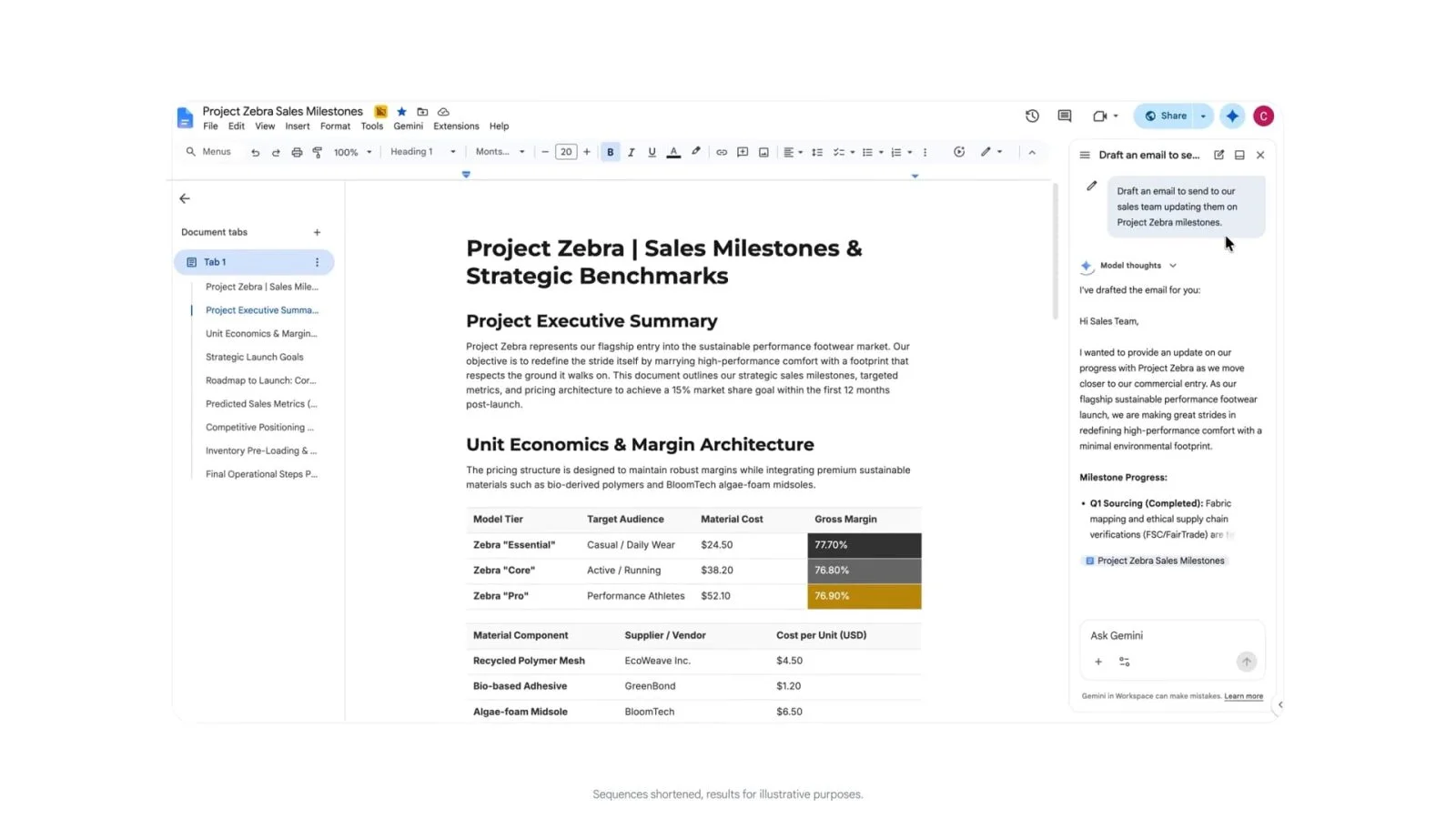
The updated Gemini allows for impressive cross-functionality, which could redefine how users interact with Google applications daily. For example, the capability to draft an email with feedback requests directly from Google Docs removes the need to flip back and forth between applications, effectively streamlining the workflow. Similarly, Google Chat now enables users to find meeting times, schedule appointments, and manage calendar conflicts directly from the chat interface, saving time and preventing interruptions. Google Tasks extends this idea of seamless productivity, letting users set reminders and create to-do lists without navigating away from their current application. With all these improvements, you have to wonder—how much time could this save the average user?
Moreover, imagine the benefits for teams that use Google Workspace for project management. Tasks typically requiring multiple app switches—like compiling feedback, adjusting schedules, and organizing information—might now be handled in a single dash, allowing for a more fluid approach to collaboration. This interconnected capability could address one of the typical pain points in workplace productivity: managing multiple tools and applications with disparate features.
Examples of New Prompts
Here are some illustrative commands that show Gemini's broader capabilities. Some of these may resonate immediately with users familiar with Google’s productivity suite:
- In Gmail, use Gemini to prompt: “Create a strategy brief for this project with goals, milestones, and next steps.”
- In Gmail, generate a spreadsheet with: “Create a tracker for this project in a new spreadsheet.”
- While in Docs, command: “Turn this proposal into a slide deck for my director using @presentation as a style reference.”
- In Chat, ask: “Create a deck outlining Project Zebra with the latest updates.”
- Within Drive, instruct: “Create a customer insights deck from project Zebra using my project files including sheets, reports, and emails.”
The creativity in these commands reflects a clear understanding of real-world applications. They’re designed to meet the needs of users who require quick and efficient methods to integrate various project components. (And this is the part most people overlook.) The depth of functionality here can transform how efficiently professionals can accomplish their tasks. Why waste time when you can streamline your efforts with a simple command?
Availability of Updates
This enhancement began rolling out this month, affecting a wide range of Google Workspace subscribers. It's accessible to Google AI Pro subscribers—albeit with limitations on scheduling capabilities—as well as Google AI Ultra users. This rollout represents a strategic push toward greater automation within the Workspace environment, catering especially to a diverse audience. The targeted editions include:
- Business editions: Standard and Plus
- Enterprise editions: Standard and Plus
- Frontline Plus editions (limited to scheduling functions)
- Education add-ons: Google AI Pro for Education
- Other add-ons: AI Expanded Access
With this rollout, Google reinforces its commitment to improving cross-app productivity, ultimately enhancing the user experience within the Workspace environment. Yet, one cannot help but wonder—are these capabilities sufficient to fend off rising competition from other productivity platforms? Microsoft, for instance, is always innovating within its own Office suite, making this battle for user attention increasingly complex.
Implications and Future Outlook
The introduction of unified Gemini features isn't just about functionality; it’s about positioning Google Workspace as a more competitive solution in the productivity software market. This change could set a precedent for future developments where roles within teams become less about handling separate tools and more about collaborative efforts within a singular ecosystem.
What this means for you, as a user or professional in this space, is an opportunity to rethink how you approach your daily tasks. The newly integrated features could potentially lead to a cultural shift in how teams communicate and work together. If Google continues to enhance these capabilities, it may very well redefine your standard workflow, removing the distractions inherent in switching applications constantly.
However, skepticism remains. Google’s history with product launches suggests that while initial features may be compelling, sustained engagement with these tools will depend on how users respond and adapt over time. Users will have to explore these updates to uncover their true value. But given the pace of these enhancements, staying informed seems necessary if you want to make the most of your productivity. It's all about adapting to technology's rapid march—can you keep up?
Discussion
Sign in to join the discussion.