The Pixel 11 introduces multi-screen saver options and a new “Charge” style, enhancing the functionality of its display.
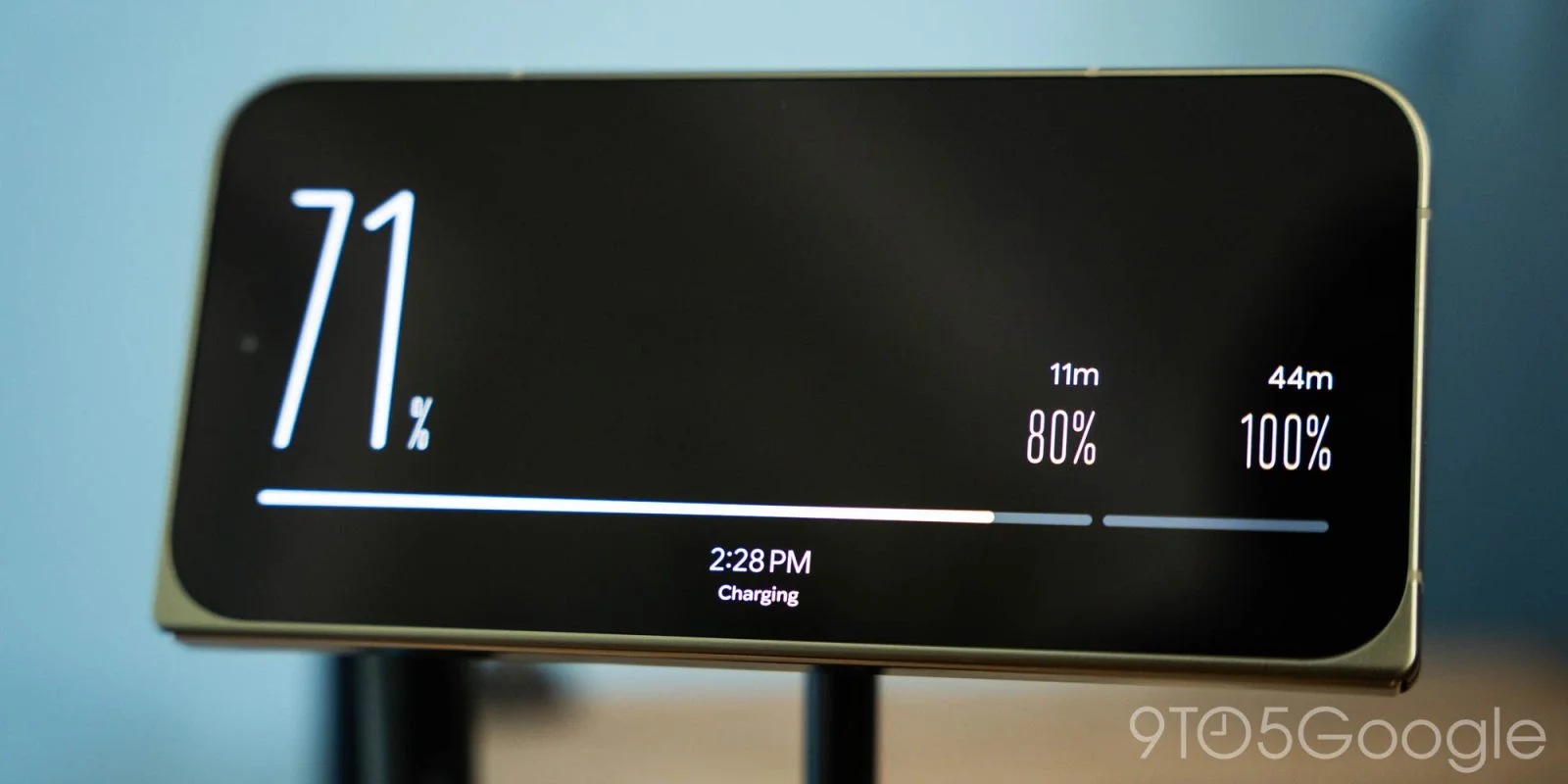
Google has upgraded the screen saver options for the Pixel 11 series, introducing new functionality that allows users to select and switch between multiple screen savers. This feature brings the Pixel lineup closer to Apple's iPhone, which introduced a similar "StandBy" mode, albeit with different navigation mechanics.
Context Behind the Upgrade
The timing of this upgrade is telling. As smartphone users increasingly seek customization and versatility in their devices, Google's move reflects a competitive response to Apple. Apple's "StandBy" mode—pioneered with iOS updates—has garnered positive feedback for enhancing the utility of the iPhone when docked or charging. This feature adds a layer of functionality, transforming the device into a mini smart display. For Google to make similar advancements indicates that they’re not merely playing catch-up; they’re actively engaging in a battle for user attention and preference.
Navigation Mechanics: A Double-Edged Sword
On the Pixel 11, switching between screen savers requires using the back gesture—a swipe from the edge of the screen—making it slightly cumbersome, particularly on the Pixel Fold due to its fingerprint sensor placement. While in theory, gesture-based navigation is intended to streamline the user experience, in practice, it can often complicate simple tasks. Unlike the straightforward swipe functionality seen on iPhones, this method may take some getting used to for users transitioning from Apple devices.
What this means for you, the user, is a learning curve that could frustrate some, particularly those who expect an intuitive interface. One might wonder why Google didn’t adopt a simpler, more user-friendly approach. Also, for users of the Pixel Fold, the placement of the fingerprint sensor could make this task even more cumbersome, raising questions around design choices. It's a classic example of how technical advancements don't always translate into enhanced user experiences.
New Charging Aesthetics
Among the new styles available is "Charge," which features a minimalist design that prominently displays the time and battery percentage. This screen saver not only shows your battery level but also includes a progress bar with milestones at 80% and 100%, indicating optimal charging times when fast charging typically slows down. It’s designed to offer time estimates for charging completion, making it a practical addition to the Pixel ecosystem.
But here’s the kicker: minimalist designs can often strike a perfect balance between function and aesthetics. Visually, the "Charge" screen saver aligns well with modern design trends that prioritize simplicity and utility. This focus could resonate with consumers looking for both form and function in their devices. Still, you could argue that it simplifies a feature that shouldn’t require simplification—after all, isn’t this info readily available in the settings? Perhaps it’s a feature for the sake of a feature, rather than a meaningful upgrade.
Enhancements to Clock Screen Saver
The updates don't stop with the "Charge" theme. The "Clock" screen saver has also received significant enhancements. Combining both digital and analog styles, it now offers more customization options that draw inspiration from the lockscreen clocks introduced in Android 14. Users can expect a more personalized experience as they can tweak the design to better suit their preferences.
This customization aspect could genuinely attract users who value personal expression through their technology. It’s a direct acknowledgment of how consumers increasingly desire a more tailored experience. Customization options can create a sense of ownership over the device, turning it from a simple communication tool into a reflection of personal style. The challenge lies in how effectively this customization will be implemented—will it be intuitive or bogged down by complexities? (and this is the part most people overlook)
Availability of New Features
These advanced screen saver features come pre-installed on the Pixel 11 devices, suggesting that they may eventually roll out to older Pixel models in future updates. This strategy could serve as a calculated move by Google to keep older devices relevant, creating a sense of community and continuity among Pixel users. Perhaps it’s also a nod to the idea of sustainability in tech—extending the life of older hardware through software upgrades may appeal to environmentally-conscious consumers.
However, some will be watching closely to see if the older devices can handle these new features effectively. Performance issues could easily sour the experience of long-time users who’ve stuck by the brand. The fact that essential features are only being made available now raises questions—are these upgrades reactive rather than proactive?
Explore More on Google Pixel:
- Pixel 11’s Magic Capture addresses modern parenting challenges
- Google Pixel’s strategy shift: Projected 13 million shipments in 2026, ending China production
- Tap to Share feature rolling out for Pixel 6 and newer
Future Outlook and Implications
As Google continues to enhance its Pixel lineup, the implications of these changes could ripple through the broader tech industry. Will we see more companies adopting gesture-based navigation to rival Apple's smooth interface, or will this move expose gaps that hackers can exploit or users will lament? The competitiveness of the smartphone market suggests that every small upgrade is part of a much larger strategy to stave off obsolescence and capture a more extensive consumer base.
We're in a time where features as seemingly trivial as screen savers can dictate user loyalty and satisfaction. If you’re working in this space, pay attention: every shift, every upgrade, comes with challenges and opportunities. Iteration over innovation might become the name of the game for tech giants as they navigate a growing chorus of consumer expectations. These changes might seem minor, but in tech, small shifts in user experience can lead to significant market consequences.
Discussion
Sign in to join the discussion.