Gemini’s Connected App can manage notebooks, sources, and notes from chats, with availability for personal and Workspace users.
Gemini Notebook is moving from the Gemini app’s side panel into the conversation itself. Google’s new Connected App integration lets users work with notebooks through natural-language prompts, bringing saved research and chat context closer to the questions they ask. The change is less about adding a new place to store information than about reducing the distance between a conversation and the material a user has already collected.
Google first made Notebooks available in the Gemini side panel, where users could open the feature separately from the main chat. The new connection builds on that access, much like the app’s integrations with Google Workspace and Photos. Gemini can identify when a prompt calls for the Notebook app and act on the user’s notebooks from within a chat. That puts the assistant in the role of an intermediary: it interprets a request, selects a notebook task, and carries it out without requiring the user to switch views.
Notebook tasks become chat commands
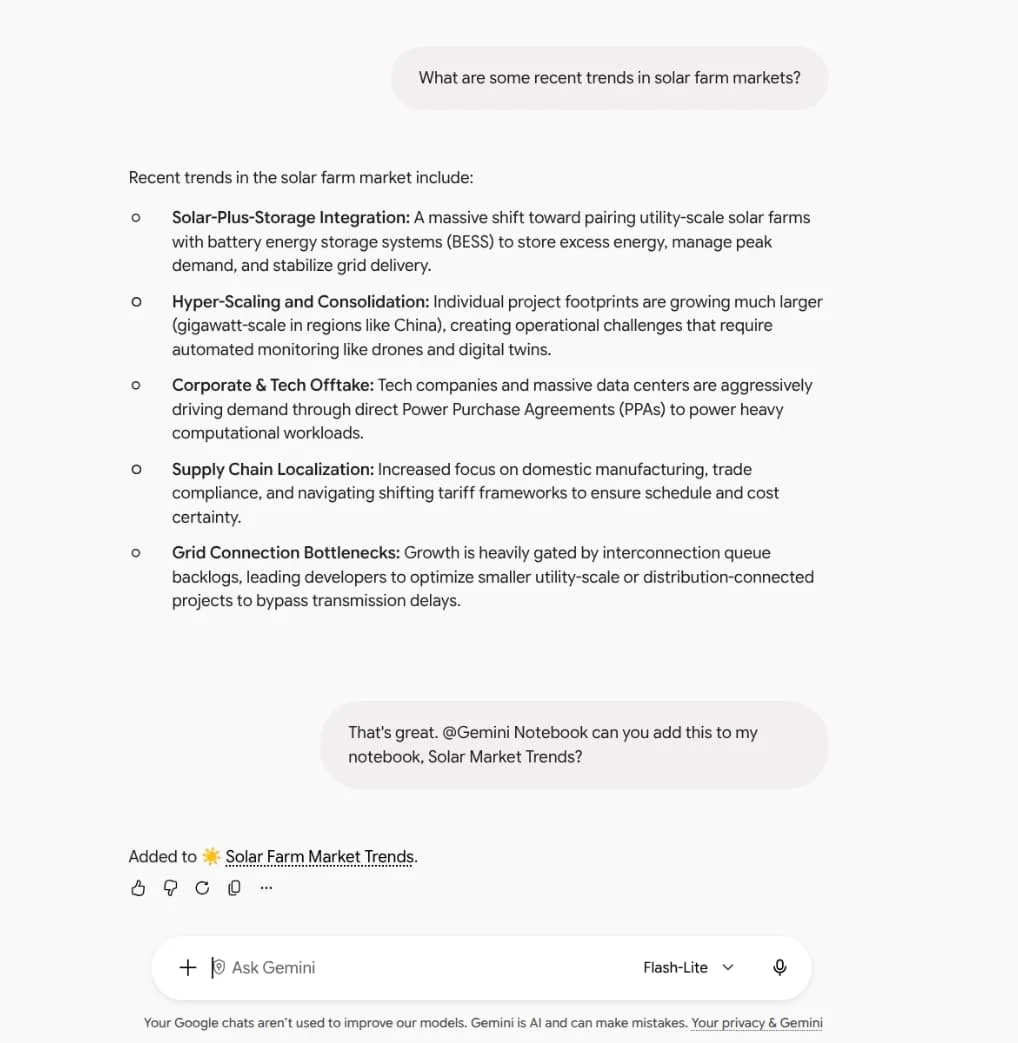
Users can create, edit, or delete notebooks; add, update, or remove sources; and save notes. They can also ask Gemini to list a notebook’s sources or answer questions using its contents. For instance, a user might ask it to create a notebook on solar farm market trends, save a conversation to a biology course notebook, or find what their notebooks say about butterfly migration. These examples cover both sides of the workflow: organizing information and retrieving it later.
Gemini Notebooks were already available in the app’s side panel. This update changes how users reach and manage them: relevant requests can trigger notebook actions directly in chat, without requiring users to open the panel and navigate its contents first. That saves a step, but the larger effect is that notebook management becomes part of the conversation rather than a separate activity.
Here’s the thing: a conversational interface can make a collection of sources easier to use, especially when the user remembers a question but not exactly where the supporting material lives. Asking Gemini to find what a notebook says about a topic is a more natural route than manually opening files and scanning them. It can also help users add a useful exchange to a notebook while the subject is still in view.
But convenience depends on the assistant interpreting the request correctly. A notebook may contain material for several purposes, and a short prompt might not make clear which collection or source the user means. Users will still need to check that the right notebook was changed and that an answer reflects the material they intended to consult. A faster command is useful only when its result is easy to inspect.
Availability and default settings
The integration is available now to Google Workspace customers, Workspace Individual subscribers, and people using personal Google accounts. Google has enabled it by default for users globally, with one regional exception: in the European Economic Area, it’s off by default. The difference means that users’ first experience will depend partly on account type and location, even though the feature is offered across these groups.
That default makes the chat experience immediately useful for many users, while EEA users will need to turn the connection on before asking Gemini to manage notebook material. The practical shift is straightforward: notebook content can now inform a conversation, and the conversation can update the notebook. This is more significant than it looks for people who already rely on both chat and saved research, because it links a reference collection to the place where questions are being formed.
The setting also matters because the integration can make changes, including deleting notebooks and removing sources. Those actions are part of the feature set, not merely a way to search. If you’re working with notebooks that hold course notes, research, or other material you want to keep organized, you’ll want to be clear in your prompts and review the result when Gemini changes a collection.
What the connection changes
Similar systems typically gain their value from reducing small interruptions: opening another panel, finding a collection, and then returning to the original task. Removing those steps can make a feature feel more present in everyday use. It may also encourage users to treat notebooks as working records that evolve alongside their conversations, rather than as archives they revisit only when they need a specific fact.
And yet. The assistant’s ability to act on notebooks doesn’t by itself tell users how it chooses among multiple relevant collections, how it handles ambiguous instructions, or how clearly it will show the sources behind an answer. The available description establishes that Gemini can use notebook contents and perform management tasks; it doesn’t answer those usability questions. They’ll shape whether users trust the integration for routine organization or reserve it for simple lookups.
There’s a broader product choice here. Google is making its separate services available through a common conversational interface, so the chat can become a front door to stored content as well as a place to ask questions. That approach can reduce friction, but it also makes the quality of the interaction depend on the assistant’s ability to route a request to the right service and return a result that users can verify.
For now, the concrete change is modest and practical: users can manage notebooks with prompts instead of navigating to the side panel first. The feature’s longer-term usefulness will depend on whether that convenience holds up when a notebook grows, a request is unclear, or a user needs to understand where an answer came from. Less navigation. More reliance on the assistant’s judgment.
Discussion
Sign in to join the discussion.