Apple's iOS 27 introduces a Discover section in Wallet, helping users access features and guides more efficiently and easily.
Enhanced Usability with the New 'Discover' Section
With the latest update in iOS 17, Apple Wallet sees an intriguing addition—a new 'Discover' section designed to enhance user engagement and functionality. This update was introduced in beta 5, which suggests Apple is keen on refining user experiences by making interactions feel smoother and more intuitive. Such updates are not just routine but part of a broader strategy to keep users invested in their ecosystem, as competition mounts from alternatives, including Google Wallet and various fintech solutions.
Streamlining Access to Wallet Features
Apple Wallet acts as a digital repository consolidating essential services. Here’s what you can store:
- Credit cards, encompassing the Apple Card
- Keys for cars, hotels, and homes
- Driver’s licenses
- Apple Pay and Apple Cash
- Transit cards
- Boarding passes
- Event tickets
- School and work IDs
- Order tracking and more
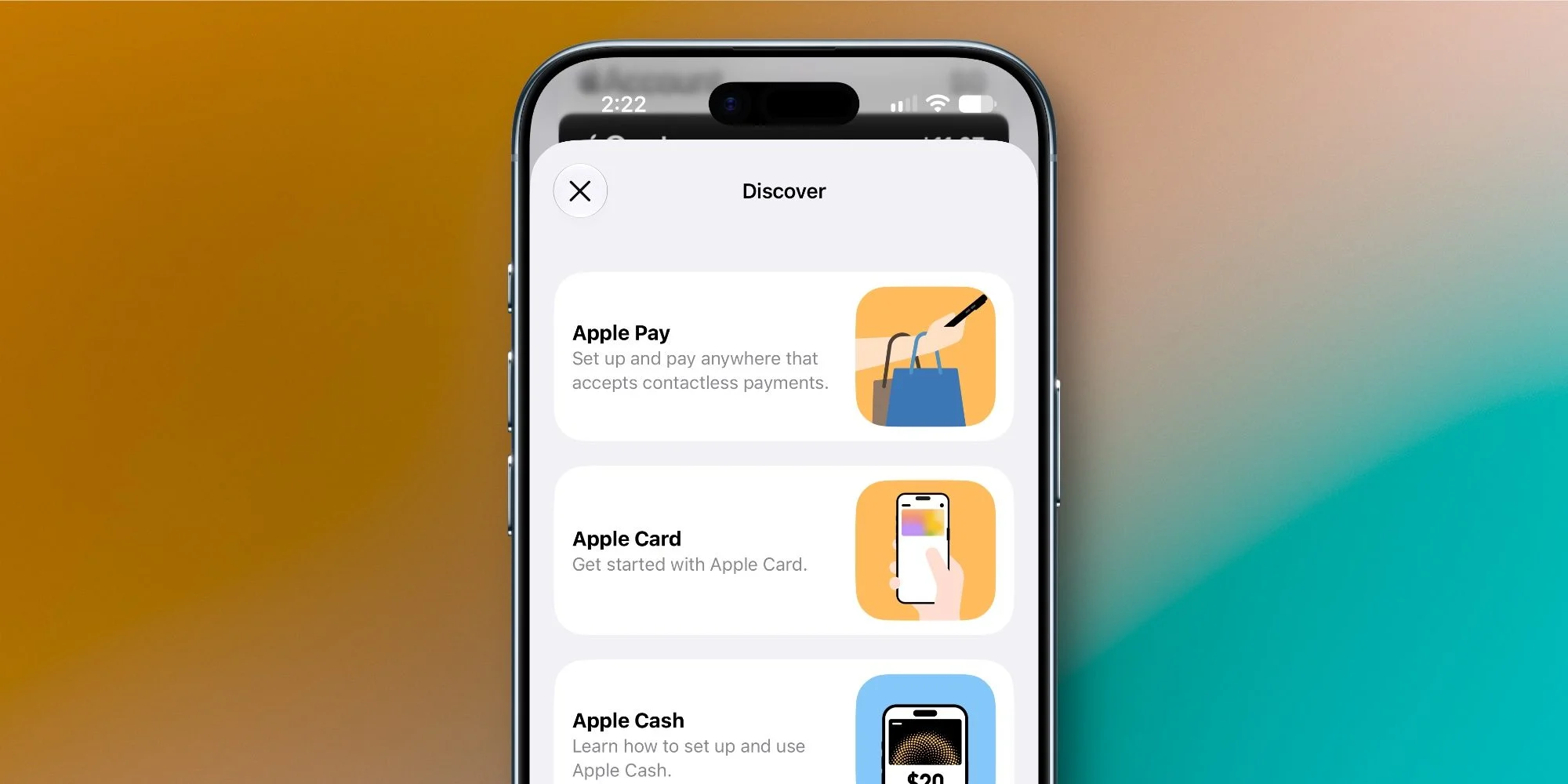
The integration of the 'Discover' feature is timely. As the number of services contained within Apple Wallet grows, so does the complexity of navigating these options. Now, users can access educational guides on maximizing the app's functionality. This section can be found easily by tapping the three-dot icon in the top-right corner of the app. Apple recognizes that even loyal users can feel overwhelmed by the rapid addition of features, and this appears to be a calculated move to address potential frustrations head-on.
Guides and Feature Shortcuts
The 'Discover' area includes clear guides on popular features like Apple Pay, Apple Card, and transit passes. If you're struggling to figure out how to add an Apple Pay card or set up Apple Cash, these guides provide step-by-step instructions that can save time and reduce potential errors. Each guide is not only informative but offers shortcuts that make navigating the app more user-friendly. If you're working in this space, you know that redundant steps can drive users away, so this streamlined approach is well-timed.
Overall, Apple's attention to educational resources reflects a growing emphasis on user empowerment. This update isn't just about adding features; it's about encouraging users to engage fully with the Wallet's capabilities. Plus, along with these enhancements, users can expect functionalities like group bill-splitting, importing physical passes, and managing Apple trade-in quotes in future releases. These additions cater to a mobile-centric lifestyle where convenience is paramount, appealing to younger, tech-savvy demographics who value efficiency.
The thoughtfulness behind this update cannot be overstated. By making a vast array of Wallet's features more accessible, Apple is not just improving usability; it's fostering user confidence in navigating digital wallet solutions. Historically, fintech innovations have struggled with user adoption due to complexity. Apple’s approach could very well lead to increased engagement and market share, especially as more individuals turn to digital wallets, particularly in an era increasingly defined by cashless transactions and mobile payment solutions.
Have you tried the new Discover section in Apple Wallet? Share your thoughts in the comments section.
Implications and Future Outlook
The implications of the 'Discover' section are significant. It not only enhances Apple's competitive standing against other digital wallets but also sets a precedent for how financial apps should consider user education. This focus on accessibility reflects a broader industry trend: As digital payments evolve, the need for clear, readily available information becomes essential.
This can potentially change user behavior. With easier access to guides and resources, users might explore features they previously ignored. The new focus could increase the transactional volume within the app, translating to greater adoption rates for features like Apple Cash and group bill-splitting. If you're a developer or marketer in this field, this is a pivotal moment—understanding these enhancements could shape future strategies for user engagement.
And this is the part most people overlook: While adding features is great, teaching users how to use them may be even more essential in fostering long-term loyalty. It isn't just about enhancing a product; it’s about creating a community of users who feel educated and empowered. As Apple continues to innovate, it'll be interesting to see if this model will be replicated across its suite of applications, pushing the entire tech ecosystem towards a more user-centric design ethos.
Top iPhone Accessories
- AirPods Pro 3 (now only $189, down from $249)
- MagSafe Car Mount for iPhone
- 10-year AirTag battery case
- 100W USB-C fast charging power adapter
- AirTag 2 (1-pack / 4-pack)
FTC: We use income earning auto affiliate links. More.
Discussion
Sign in to join the discussion.