Turn your spare iPad into a centralized hub for smart home management using the intuitive Dashboard for your Home app.
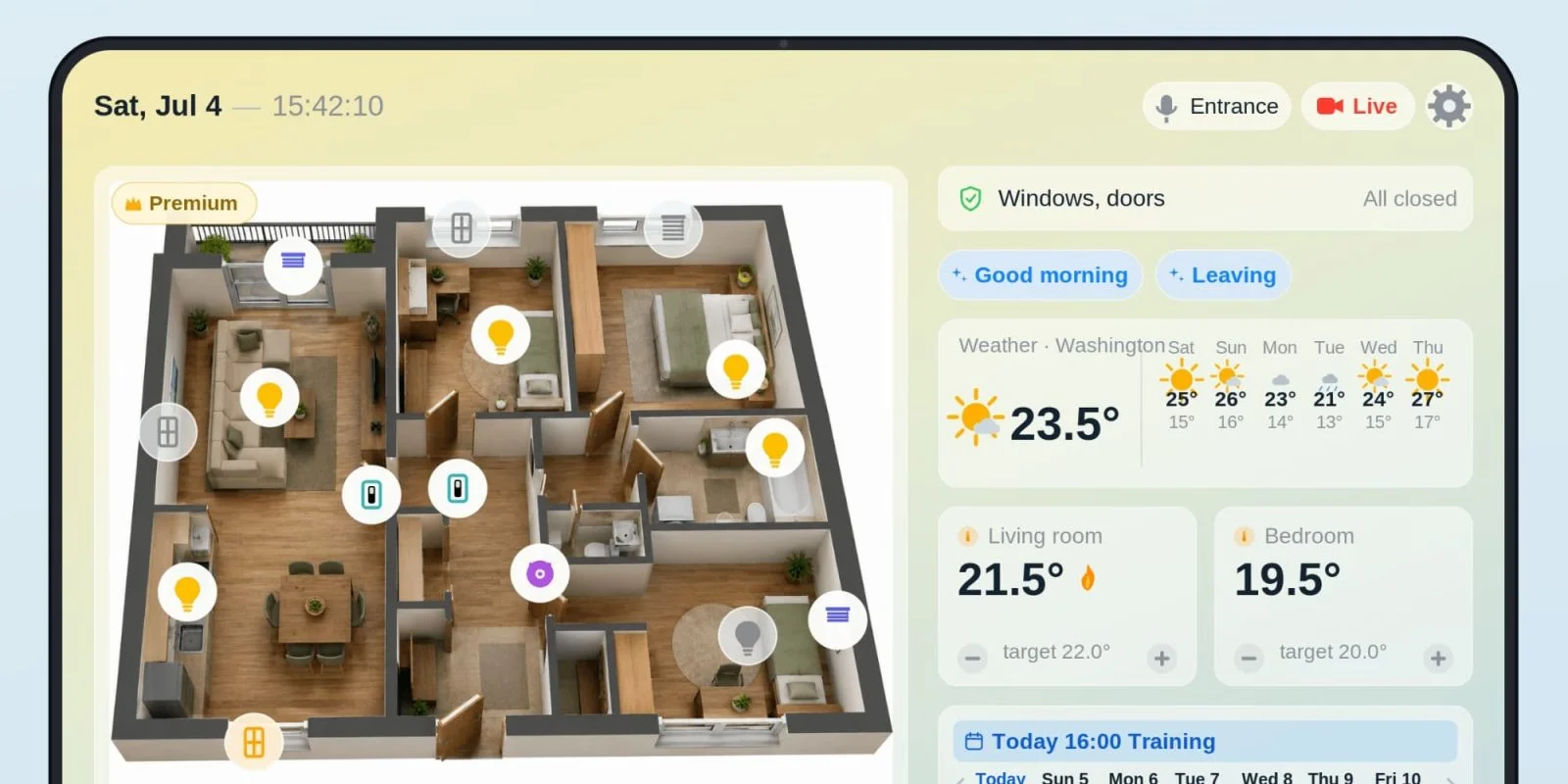
The quest for an efficient smart home control center can be fulfilled by repurposing an old iPad into a dedicated management tool. The Dashboard for your Home app revolutionizes this concept, transforming the iPad into a streamlined command center for all your smart devices, while integrating features like camera feeds, thermostats, lighting controls, and even a shared calendar. This approach is practical for those who might have a defunct device lying around and want to breathe new life into it, while enhancing the functionality and connectivity of their home.
Camera Support and Security Features
The app stands out thanks to its camera support, showcasing live previews from up to four Apple Home cameras at once, with an option to upgrade for unlimited access. This flexibility reflects a growing trend where home security is integrated into overall smart home management systems. A one-tap button instantly initiates a live view of all connected cameras, allowing for quick full-screen access to individual feeds. This means you're not just passively watching; you're actively monitoring your space. Built-in two-way audio support enhances communication through compatible cameras, adding a layer of functionality to security monitoring. In a world where security concerns are paramount, this feature allows users to not just observe but interact, potentially deterring unwanted visitors or providing reassurance to family members.
Functionality of Dashboard for Your Home
Managing your smart home becomes intuitive with capabilities like controlling up to four thermostats and eight switches, such as lights and outlets, organized by room. This level of organization enables users to create a tailored environment that matches their routines and preferences. A six-day weather forecast tailored to your home’s location is also prominently featured, keeping you informed of local conditions. People tend to underestimate how much weather affects daily decisions; having this feature at your fingertips eliminates the need to check outside or rely on multiple apps.
The calendar integration adds a personal touch, providing a weekly overview of events while allowing users to highlight upcoming activities. You can customize text colors for different calendars, making it easier to differentiate between various schedules, like work and recreational commitments. This level of personalization isn't just a gimmick; it speaks to the importance of organizing the chaos of modern life, especially for families or busy professionals.
One more convenience? The app’s automatic sleep mode conserves battery, waking the device when it detects motion or with a simple tap. This proactive power management strategy ensures your iPad remains functional without requiring constant charging. It also supports both light and dark modes, optimizing visibility according to environmental conditions—or user preference.
Interactive Features and User Experience
Another intriguing addition is the interactive 3D floor plan feature. Users can upload their home's layout, and the app visualizes it with interactive icons representing lights, blinds, sensors, and locks, enhancing room management. Tapping an icon lets you control devices directly from the floor plan, making the experience more intuitive. This kind of interactivity can significantly reduce the learning curve for less tech-savvy users. (and this is the part most people overlook) It transforms what could be a confusing series of app screens into a straightforward and engaging experience.
Live camera thumbnails at the bottom of the app’s interface allow for quick monitoring of critical areas like entry points and outdoor spaces without switching between screens. This accessibility means you won't waste time fumbling through multiple apps or views to see what’s happening in key areas of your home. Quick-scene buttons streamline common actions, reinforcing user accessibility to window and door statuses. This feature is especially useful during emergencies, as it allows for instant reactions.
The current temperature is displayed alongside independent room temperature management, while the calendar panel reflects upcoming events with precise countdowns for important dates, ensuring users stay organized and informed. Configuration settings can be easily backed up to iCloud, enabling effortless syncing across multiple devices. This capability is essential in an age where users operate on different devices, ensuring a connected and fluid experience.
The app itself is free to download, while a Premium subscription for $9.99 per year grants unlimited device management capabilities and additional features like the 3D floor plan. This pricing model hits the sweet spot—affordable enough to invite casual users but feature-rich for serious smart home enthusiasts.
Final Thoughts
If you're looking for a practical way to repurpose an unused iPad, this app does the trick beautifully, serving as a focal point for HomeKit users. It pairs nicely with wall mounts designed for iPads, making it an aesthetically pleasing addition to any room. Compatibility is straightforward, requiring iPadOS 17 or later and an active HomeKit setup, while the app also functions well on iPhones in a vertical layout for those who want to test its features.
Available for download on the App Store, the Dashboard for your Home app provides a user-friendly interface for smart technology management without overwhelming investment. This makes it a competitive option in a market filled with both simple and complex solutions. Looking ahead, as smart home technology evolves, hopefully, we’ll see even more innovations that simplify and enhance user experience in ways we might not yet imagine.
Future Outlook
What this means for you is that the evolution of smart home technology will continue to favor personalized and intuitive solutions. As more households adopt smart devices, the demand for effective control centers like this one will only grow. Companies will likely focus on integrating more features that converge seamlessly with user schedules and environmental conditions. As user needs shift, applications like Dashboard for Your Home will need to stay agile, incorporating feedback and improving functionality to stay relevant in an increasingly competitive arena. With the right adjustments, the app could become a staple in smart homes globally, proving that sometimes, the simplest solutions yield the most satisfaction.
Discussion
Sign in to join the discussion.